


 4,7
4,7


Kaasino Mobile App — Full Casino Power in Your Pocket
Commutes, lunch breaks, and sofa sessions all demand the same thing: software that does not fall over when signal dips. We engineered the Kaasino casino app as a standalone build — sportsbook markets, reel catalogues, streamed dealer tables, and poker rooms inside one install sized for everyday handsets. Push alerts for fresh promos, a wallet panel you reach in two taps, and agents on standby around the clock come bundled with every Kaasino mobile download. Pull the file, register, fund from £20, and real-money play begins while the kettle still heats.
Build Specs and Handset Support
Every public release passes bench tests on Samsung, Pixel, and current iPhone hardware before we flip the switch — snapshot below.
| Build Metric | Reading |
| Current Release | 2.4 |
| Android Package Weight | 36 MB |
| Installed Footprint | 72 MB |
| Compatible OS | Android, iOS |
| Interface Language | EN |
| Available Verticals | Sports betting, slots, live casino, poker |
| Wallet Rails | Visa, Mastercard, POLi, BTC, ETH, USDT |
Figures track the production channel we serve to UK members today.
Getting the Installer onto Your Device
Grab the package from the Mobile App or Download area — Android ships as APK, Apple as a direct install file.
Step by step download and installation guide for Kaasino apk.
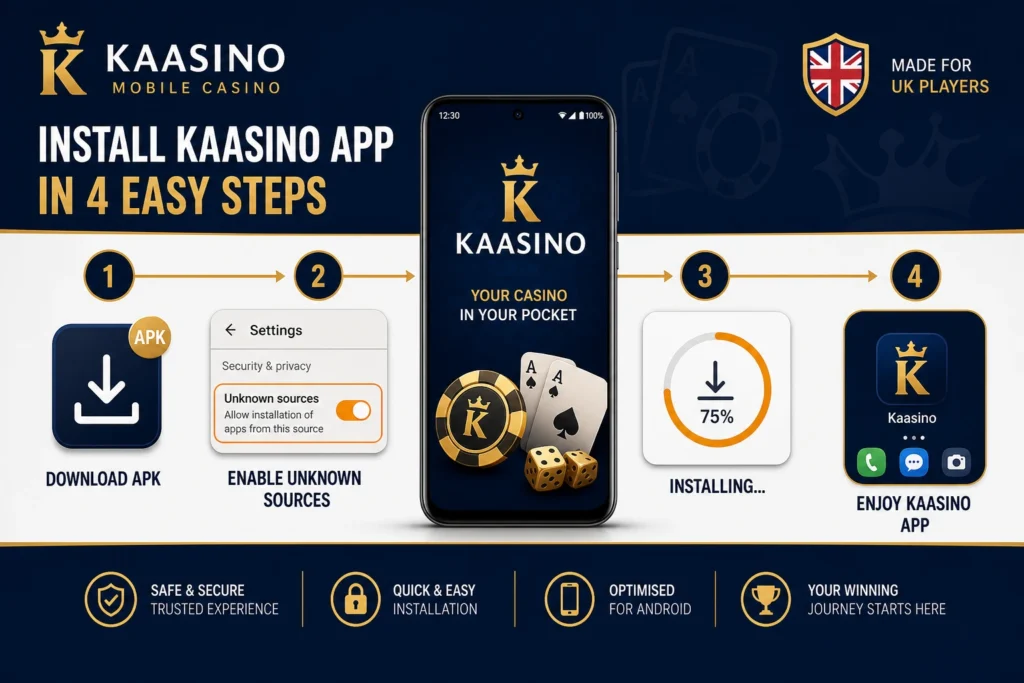
Android Walkthrough
Side-loading takes roughly sixty seconds once permissions are set — walk through each point below.
- Fetch the file — Open the app hub and hit Download APK; the package lands in your Downloads folder.
- Adjust security — Flip on installs-from-unknown-sources inside Android privacy settings for this session.
- Run setup — Tap the saved APK, confirm the prompt, and wait for the progress bar to finish.
- Authenticate — Launch the icon, sign in with existing credentials or create a fresh profile on the spot.
Ledger history and GBP balance mirror the browser the instant login succeeds.
Apple Walkthrough
iOS needs a one-time developer trust tap — nothing beyond that differs from Android day to day.
- Pull the package — Choose Download for iOS inside the mobile hub and let the file save locally.
- Trigger install — Open the saved profile when prompted and begin the on-screen setup flow.
- Trust the cert — Visit Settings → General → VPN & Device Management, select the developer entry, and confirm trust.
- Open and play — Return to your home screen, tap Kaasino, and the lobby loads identically to the Google build.
Trust confirmation is a single action — afterwards both platforms behave the same.
Android Walkthrough
Side-loading takes roughly sixty seconds once permissions are set — walk through each point below.
- Fetch the file — Open the app hub and hit Download APK; the package lands in your Downloads folder.
- Adjust security — Flip on installs-from-unknown-sources inside Android privacy settings for this session.
- Run setup — Tap the saved APK, confirm the prompt, and wait for the progress bar to finish.
- Authenticate — Launch the icon, sign in with existing credentials or create a fresh profile on the spot.
Ledger history and GBP balance mirror the browser the instant login succeeds.
Apple Walkthrough
iOS needs a one-time developer trust tap — nothing beyond that differs from Android day to day.
- Pull the package — Choose Download for iOS inside the mobile hub and let the file save locally.
- Trigger install — Open the saved profile when prompted and begin the on-screen setup flow.
- Trust the cert — Visit Settings → General → VPN & Device Management, select the developer entry, and confirm trust.
- Open and play — Return to your home screen, tap Kaasino, and the lobby loads identically to the Google build.
Trust confirmation is a single action — afterwards both platforms behave the same.
Account Creation and Sign-In Inside the App
Staking real quid requires a verified profile; the flows below apply equally on phone and desktop.
1. Registration
Profile setup accepts one-tap social paths or manual entry — Facebook, Instagram, and Twitter only; we skip Google on handheld builds.
Mandatory fields: handset number or inbox address, passphrase, GBP wallet currency, plus an optional promo key. Tick terms acceptance and age confirmation. Kaasino green-lights new Kaasino accounts the moment contact validation completes.
2. Account Login
Credentials route through email or mobile plus passphrase, or a linked social glyph for passwordless entry. Recovery lives under Forgot password? — Kaasino fires reset guidance to your chosen channel within moments.
3. Verification KYC
Document checks activate ahead of maiden cashouts or when cumulative transfers cross internal thresholds. Submit legible ID photography and a recent utility bill through the profile vault; Kaasino compliance desks typically clear files inside twenty-four hours.
Finish Install — Mobile-Only Perks Unlock on First Login
What the Handheld Build Actually Delivers
Desktop parity was the brief — we relocated features, never removed them:
- Entire vertical catalogue: sports lines, reel walls, streamed tables, and poker lobbies.
- Embedded wallet rail for instant top-ups and outbound transfer requests.
- Configurable push pings for promo drops, gift credit, and race start times.
- Interface zones mapped to thumb reach for one-handed Tube or bus sessions.
- Agent access via in-app chat, inbox, and social inboxes without switching apps.
- Shorter cold-start loads plus gift tiers reserved strictly for install holders.
Handheld-native speed is the main reason veterans abandon browser tabs after their first week.
Native Client Versus Browser Tab
Either entry point functions — the install simply absorbs heavier graphics without stutter.
| Capability | Native Install | Browser Access |
| Battery consumption | Lower drain during sessions | Higher drain during sessions |
| Connection tolerance | Tolerates patchy signal | Needs stable bandwidth |
| Promo reach | Full mobile-only gift tier | Reduced promo visibility |
| Navigation speed | Tuned for native rendering | Can stutter on heavy pages |
| Extra tooling | Partial offline lobby cache | Standard browser feature set |
Row by row the install leads on battery draw, connectivity tolerance, and promo reach.
Download the Kaasino App and Start Playing
Three moves: fetch the installer, load £20 into your wallet, and every reel plus live seat sits in your palm. No throttling, no stripped-down lobby — British members get the full floor in pocket format. Grab the build tonight and pull your first mobile spin before midnight.
Frequently Asked Questions
 Locked out because you lost your login details?
 Does the app accept mobile numbers or social profiles for sign-in?
What usually stops me from reaching my dashboard?
No SMS or inbox message showed up — how do I fix that?
Best habits for keeping my app login secure?
Does the app accept mobile numbers or social profiles for sign-in?
What usually stops me from reaching my dashboard?
No SMS or inbox message showed up — how do I fix that?
Best habits for keeping my app login secure?